Before a computer can choose a button in a game, it needs to know which screen it is looking at. In Heroes of Might and Magic: Olden Era, an Arena match moves through Hero, skill, equipment and army choices before reaching deployment and battle. Information panels and menus can open along the way. Many of these screens already tell us what they are through their text.
This prototype reads that text automatically, shows each detected text region, and explains which words support its scene prediction. Across 640 selected frames from two walkthroughs, it assigns a current-view label to 431 and leaves 209 unknown. Those are coverage counts, not accuracy measurements. The useful result so far is a working extraction, classification and correction loop.
flowchart TD
    A[Timestamped game image] --> B[OCR text and boxes]
    B --> C[Text and position rules]
    C --> D[Current screen and evidence]
    D --> E[Phase context from past observations]
    D --> F[Human review and rule correction]
    F --> C
Figure 1. Read the image first, classify the visible screen, then use past evidence to estimate progress. Corrections improve the mappings; they do not retroactively become independent test labels.
1. What does understanding mean here?
The input is an image and its timestamp. The desired output has three layers:
| Layer | Question answered | Example |
|---|---|---|
| Text element | What text is visible, and where? | 选择英雄 near the top center |
| Current scene | Which screen or panel does this image support? | Hero selection, a skill choice, or a creature information panel |
| Large phase | How far has this match progressed? | Choosing skills, deploying units, or fighting |
These answers can differ. A Hero information panel can appear during army selection or battle. A skill stage repeatedly alternates between choosing a main skill and choosing one of its subskills. A single flat label cannot express both the visible panel and the surrounding workflow clearly.
An earlier OCR experiment read printed names inside a known scene to suggest the identities of game choices. This work asks the preceding question: can text identify the scene itself? It is called B020 in the local Perception project. Here, “understanding” means a bounded scene and phase description, not a complete representation of the game, its units or its rules.
2. Read text, then match text and position
The initial control overlay assumed fixed button locations. That failed when expanding a multiplayer submenu pushed the Other button downward: the old rectangle pointed at a different menu item. Detecting the visible text lets the program locate the words actually present in this image.
Optical character recognition (OCR) reads text from pixels. The prototype runs the installed Windows Chinese OCR engine over each full-resolution image. Its output contains words and rectangles. Neighboring Chinese characters are joined into useful text regions; large gaps split separate columns. The original text is retained, while matching uses normalized spacing, punctuation and character width.
Each resulting text region becomes an element. This does not make it a button: descriptions, numbers, headings and button labels all contain text. An optional geometric step looks for a blue connected region containing the text and proposes a larger rectangle. The default display uses the text rectangle, and the system does not infer clickability from either rectangle.
A scene mapping combines text with a screen region. For example, 选择英雄—“choose Hero”—near the upper center supports Hero selection. The same words buried in a description elsewhere should not satisfy that mapping.
One phrase may not be enough. A mapping can require several anchors, where an anchor is a piece of text in an expected region. It can also reject a match when a contradictory phrase appears. Synonyms or known alternate readings can satisfy the same anchor. Coordinates are fractions of image width and height, so the rules scale with resolution; that does not make them independent of layout or aspect ratio.
Matching is deterministic code after OCR. It ranks matching rules by explicit priority and the number of required anchors. Equally ranked incompatible rules return unknown. No language model chooses the runtime scene, and the priorities are not probabilities.
3. Two screens, one stage
Skill selection provides a concrete example because the option names change and the pages do not always show a stable “choose main skill” or “choose subskill” heading.
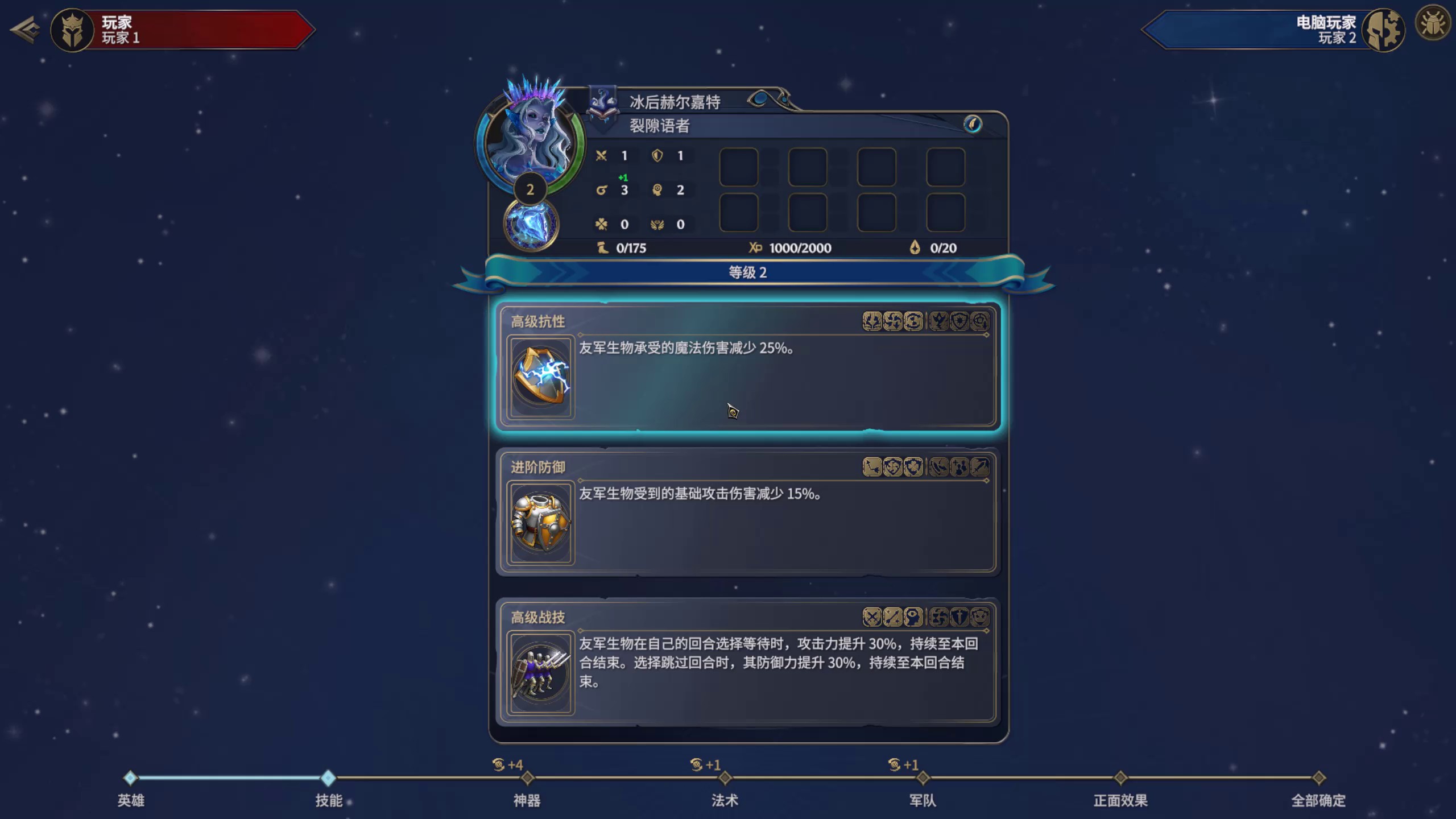
At 05:04 in the first recording, three ranked skill titles occupy three distinct rows. Along with 全部确定—“confirm all”—at the lower right, their text and arrangement support the main-skill view.
At 05:55, the screen instead contains a parent skill followed by three subskill options. Their titles occupy a different arrangement. The program recognizes this as the subskill view, while retaining the same large phase: choosing skills.
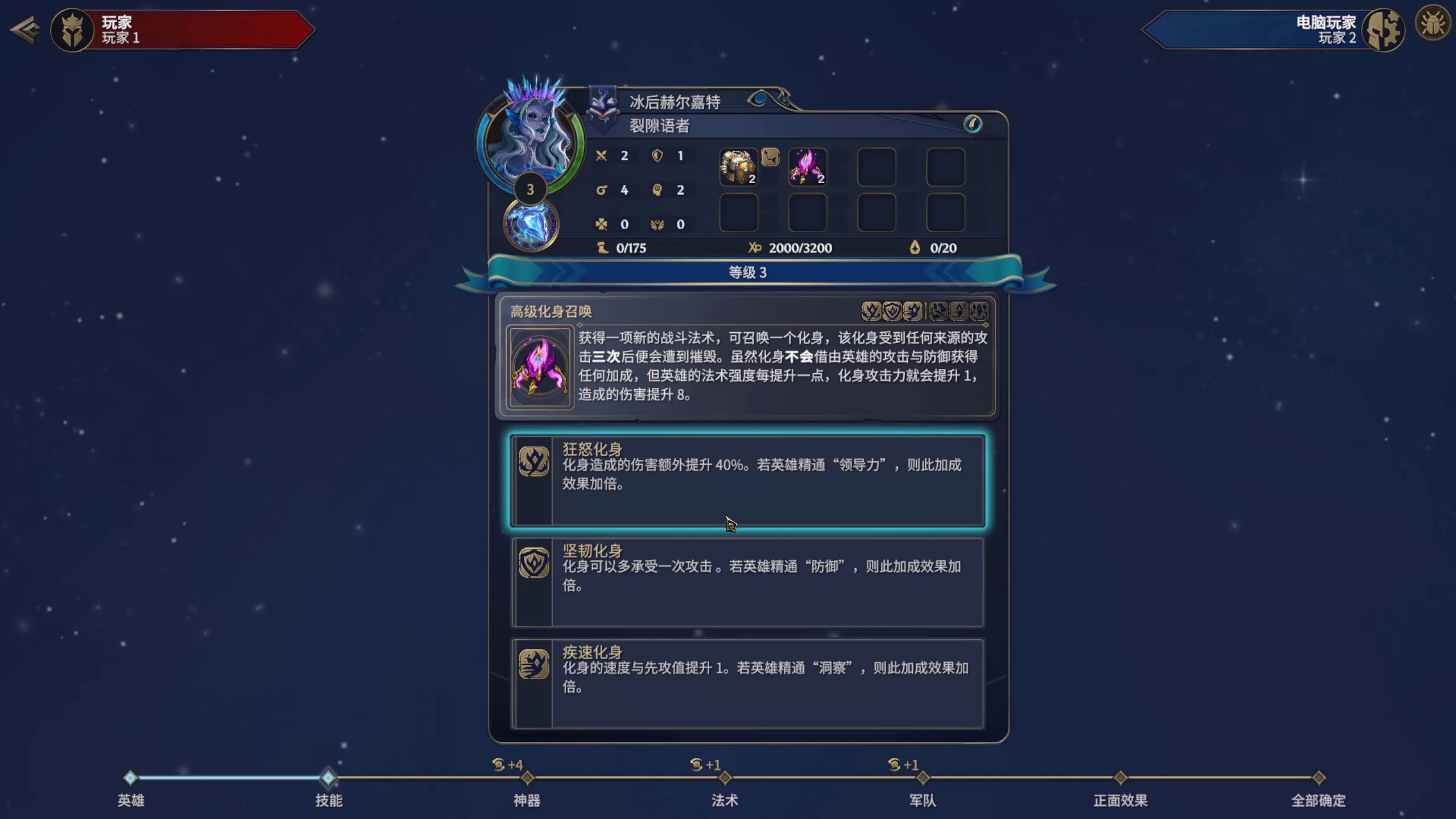
The skill-name tests use rank prefixes or the presence of Chinese text in constrained title regions, rather than a list of every possible skill name. That broadens the rule, but also creates a clear failure mode: another panel with text in the same arrangement could match. These examples explain the method; they do not prove it works on every skill page.
4. Keep current evidence separate from memory
Within a match, the prototype assumes this large-scale order:
Preparation → Hero → skills → artifacts → spells → creatures → final confirmation → deployment → battle → result.
Local views can change freely within that progression. Main-skill and subskill choices share one phase. Loading screens, tooltips and information panels can supply a local label without identifying a new phase.
The phase decoder processes observations in timestamp order. It initializes from the first explicit phase evidence. Advancing to a later phase requires two agreeing observations within 45 seconds; skipped phases are allowed because a recording can omit them. Two observations of a clearly recognized main menu can reset the match segment. These are development settings, not established optimal thresholds.
When text suggests an earlier phase, the system reports a conflict instead of silently moving backward. When no scene rule matches, the current view stays unknown. The previous phase can remain as context, with the age of its latest supporting evidence displayed separately.
That distinction prevents a common mistake: remembering “battle” does not mean the current frame visibly proves battle. Likewise, a tooltip seen one frame ago is not automatically present now. The current decoder has no maximum age that expires phase context, so stale context remains a known design limitation rather than hidden visual certainty.
The decoder uses no future observations. However, the keyframe selection does inspect the complete recording to choose useful moments. Causal decoding of those selected frames is therefore not yet an online video system.
5. The software around the detector
OCR quality is only one part of reliability. Wrong geometry can place correct text over the wrong pixels. Old rules can produce a result that a newly edited rule cannot reproduce. A save conflict can overwrite a person’s correction. These are software failures with perception consequences.
The implementation gives each component a narrow responsibility:
- OCR extraction calls the local Windows engine and retains text, geometry and explicit failures.
- Scene matching applies text-and-position mappings to one image and returns the matched evidence.
- Phase decoding consumes earlier observations and reports progress, uncertainty and conflicts.
- Review storage keeps reference labels and editable mapping revisions separate from original predictions.
- Evaluation freezes one rule snapshot, generates predictions, then compares them with confirmed references.
flowchart TD
    A[Python extraction process] -->|Image requests| B[PowerShell Windows OCR bridge]
    B -->|Words and geometry| C[Saved OCR results]
    C --> D[Python scene matching and phase decoding]
    E[Versioned rule snapshot] --> D
    D -->|HTTP results| F[Browser review interface]
    F -->|Revision checked saves| G[Mapping edits and reference labels]
Figure 4. OCR crosses a process boundary; matching and phase decoding are ordinary Python calls. The browser reviews saved results through a local HTTP service. Evaluation consumes a frozen mapping snapshot so an edit during a run cannot change its rules halfway through.
One real geometry issue illustrated this boundary. Windows OCR can return a text angle as well as word rectangles. The first projection rejected nonzero angles. The corrected version transforms those rectangles into image coordinates and reuses the native OCR results. It follows Microsoft’s OCR sample; the word rectangle contract also distinguishes the zero-angle case. Reading the words again was unnecessary because the error was in how the boxes were displayed.
The review interface shows the original video beside the analyzed frame, then displays text boxes, the current view, phase context and matched words. Clicking a word can add its text and position to a mapping. Saving uses a revision check and keeps earlier versions. Existing frame reviews are preserved; unreviewed frames can start with OCR regions for correction.
Rules edited from development examples and independently confirmed reference labels remain different kinds of evidence. If the same examples are used to improve a rule and measure it, the result describes development fit, not performance on unseen recordings.
6. What the results establish
Both walkthroughs are development data. Each contributes 320 retrospectively selected keyframes, including uniform coverage, visual changes and reported problem moments. Repeated nearby frames are correlated; a short hover can still occur between samples.
| Recording | OCR frames | Text elements | Labeled view | Unknown view |
|---|---|---|---|---|
| Session 1 | 320 | 8,991 | 237 | 83 |
| Session 2 | 320 | 9,194 | 194 | 126 |
| Total | 640 | 18,185 | 431 | 209 |
All 640 images have completed OCR processing. That means the extraction ran successfully, not that every character or text region was found correctly. The optional blue-region step proposes 367 expansions across the two recordings.
Thirty development mappings are available. The existing annotation tool’s 28-label scene vocabulary is reused with a few local-view extensions, but not every label is demonstrated or reliably recognized. Some rules have no matched example in these recordings. Textless battle controls, occluded titles, stylized letters, fades and different layouts remain difficult.
There are zero confirmed B020 frame references at this point. Accuracy for phase, base scene, overlay and current view is consequently unreported. Three assistant-inspected examples—an expanded menu and the two skill views above—are preserved as regression fixtures. They catch known implementation regressions, not unknown recognition errors.
Validation covers spatial rule conditions, contradictory and ambiguous matches, rotated geometry, phase transitions, resets, backward conflicts and prefix consistency: processing a video prefix gives the same prefix results as processing the longer sequence. Store tests cover revision conflicts and invalid edits. Browser checks exercise automatic overlays, phase and unknown-view filters, mapping construction and review prefilling. These checks establish functioning software paths; an independently reviewed dataset must establish recognition quality.
7. The next improvement
This is a mix of perception and system software. The next improvement should identify which layer fails, before adding more rules or a more complicated temporal model.
A useful evaluation separates three questions. Did OCR recover the decisive text and its location? Given correct text, did the scene mapping choose the right local view? Given those view observations, did the phase decoder advance, reset or retain context appropriately?
The next planned increment is a small, reviewed set of varied scenes plus continuous windows around transitions. Compare text alone, text with positions, and text with positions plus phase context. Report errors and unknowns per scene, as well as incorrect forward jumps, missed resets and delay at transitions. Freeze mappings before checking fresh recordings. A random split of adjacent frames would make that check too easy.
Review effort should cover plausible-looking predictions as well as unknowns: a confident-looking wrong scene can be more harmful than an explicit abstention. Unknown filters make missing coverage easy to inspect, but they are not a substitute for sampling the predictions that appear to work.
The current result is an automatic, inspectable scene-classification loop. Text provides visible evidence, spatial rules describe the current view, and a separate state machine estimates progress. Making that separation measurable is the next step toward a reliable system.
Implementation and reproducibility
The reusable implementation lives in the Perception package’s ui_navigation module. Experiment B020 owns development configurations, fixtures and run reports. text_elements.py produces OCR regions; scene_understanding.py owns matching and phase decoding; scene_rules.py owns revisioned mapping edits. The experiment’s scenes.py freezes mappings and evaluates separate phase, base-scene, overlay and current-view denominators after producing predictions.
This article describes the September 4, 2026 development run ocr-scene-development-v3, using OCR projection ocr-text-elements.v2 and scene logic ocr-scene-understanding.v1. The full Perception suite passed 307 tests in the working checkout; this included pre-existing project changes and is not a clean-checkout or production-accuracy certification. Recordings and bulk outputs stay local. The two game images above are selected illustrations from those recordings.
Comments